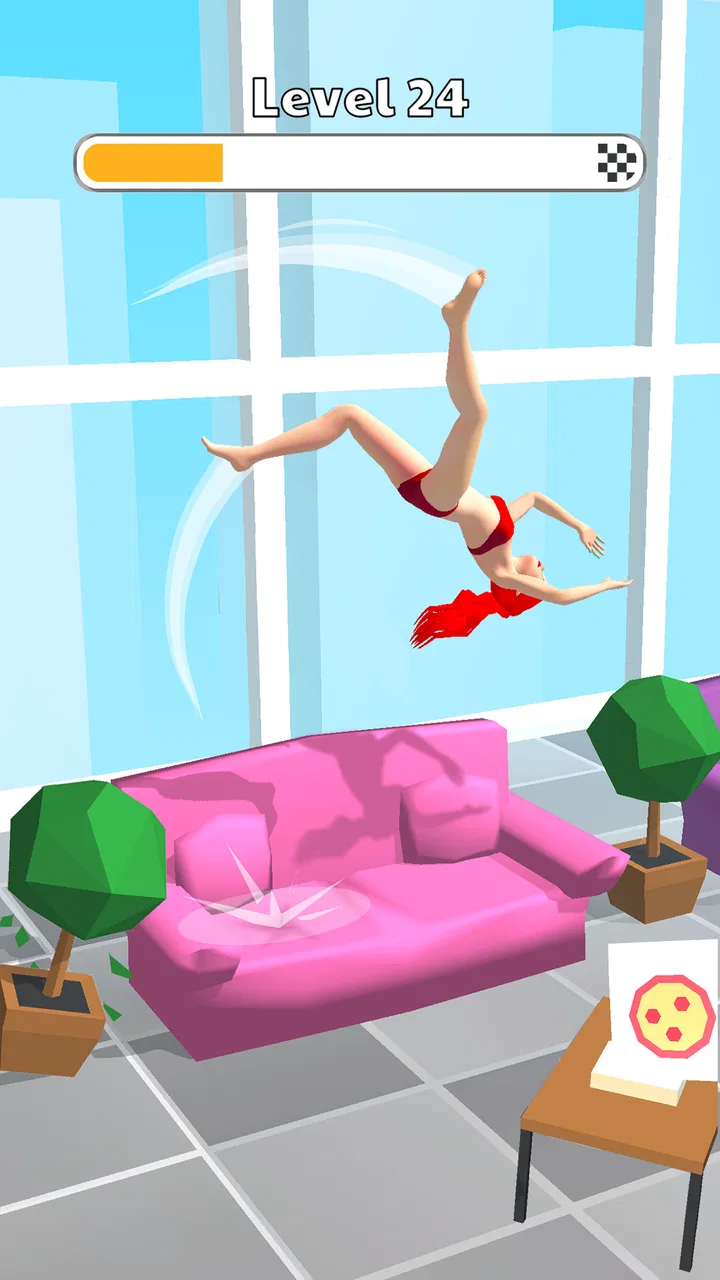
Human Flip: Jump Master Game
- 4.6
- Rating
- 10.00M
- Installs
- Free
- Price

 Analysis by App-foxy
Human Flip: Jump Master Game is the kind of arcade game I open when I want something immediate, light, and easy to understand. The basic challenge is simple: guide a flipping character through each jump, land safely, and avoid touching the floor before reaching the finish. That simplicity is exactly what makes it approachable, but it also creates the game’s main source of frustration: a tiny timing mistake can turn a promising attempt into a restart.
I spent time with it as a short-session game rather than something I would play continuously for hours. That distinction matters. This is not built around a large story, deep character development, or a complicated control system. It is a focused reflex game from CASUAL AZUR GAMES, listed in the arcade category and available free of charge. The store summary describes the central idea accurately, but the real appeal comes from learning how much control you actually have over each jump.
The game has reached more than ten million installs and holds an average rating of 4.6 from roughly eight thousand ratings, which fits my impression of its audience: people looking for a quick challenge rather than a demanding long-form game. It is rated Teen, and the current version is 1.27.35. It runs on Android 6.0 or later, so it is accessible on a wide range of devices.
You May Also Like

 Blood Strike: 2.5 Anniversary
Blood Strike’s Loadouts Turn Every Drop Into a Tactical Gamble
A close look at Blood Strike’s custom loadouts: how fast access to signature weapons reshapes its battle royale rhythm, rewards preparation, and narrows the gap between fights.

 Pandora - Music & Podcasts
Pandora’s Music Is Easy to Start, but Harder to Recover
Pandora’s strength is its low-effort path from a seed to a station. Its weak spot is how much confidence it asks you to place in connection, setup, and quiet recovery.

 8 Ball Pool
 Is Built on Rivalries, Rematches, and Routine
A close look at the rivalries, rematches, shared routines, and unanswered safety questions that turn a quick pool match into a persistent mobile community.

 Samsung Music
’s Quiet Strength Is Playing What You Already Own
Its reach comes less from spectacle than from dependable access to a personal library. That simplicity is both the app’s strongest retention engine and its ceiling.

 AccuWeather: Weather Radar
AccuWeather Review: A Quick, Clear Forecast for Everyday Decisions
For everyday plans, the best forecast is the one you can understand quickly. AccuWeather makes rain timing, radar, and local conditions easy to act on, with a few trade-offs.

 Hill Climb Racing
Why Hill Climb Racing Still Turns Crashes Into One More Run
A tiny car, a bumpy hill and one more upgrade: Hill Climb Racing keeps resurfacing because its simple chaos makes every near-miss feel personal.
More From Our News Desk



Where the simple controls become difficult
I find the controls most demanding when a jump looks easy enough to rush. This section is about spotting the difference between a late reaction and a poorly judged landing, so the next step is to check whether your setup is making that distinction harder.
The first few attempts teach timing, not strategy
The opening experience is easy to understand, but I would not call it effortless. The central action is based on flipping and jumping, so success depends on reading the distance ahead and committing to the movement at the right moment. A player coming from endless runners may initially expect to react only when an obstacle is directly in front of the character. Here, that approach can be too late. The useful skill is anticipating the landing rather than merely responding to what is already happening.
That is where many users are likely to get stuck. The objective sounds straightforward, yet the game asks for more than a single quick tap. You need to judge the arc, identify where the character will come down, and avoid treating every jump as if it used the same rhythm. When I rushed, I often made the mistake of repeating the same input after a failed attempt without considering whether the problem was timing, position, or simply an overly aggressive jump.
My most useful adjustment was to stop watching only the character. I began looking at the space where the character needed to land. That small change made the action feel less random. Instead of asking, “When should I tap?” I asked, “Where will this movement finish?” For a game this compact, that is an important mental shift.
Why a missed jump can feel harsher than expected
The no-floor rule gives every movement a clear consequence. It also means the game has little room for careless experimentation. If you prefer arcade games that let you recover from a mistake, this may feel unforgiving. The design works best for players who enjoy repeating a short section until their hands learn the timing.
I also noticed that frustration usually came from playing too quickly after a failure. A restart can create the illusion that the next attempt should be identical, but the better approach is to use the failed jump as information. Was the character too low? Did I start the movement too late? Did I focus on the next obstacle and ignore the landing area? Taking a brief pause before trying again made the game feel more skill-based and less like blind trial and error.
A practical way to read each section
When a sequence becomes difficult, I recommend dividing it into three questions. First, where does the character begin the movement? Second, what space must be cleared? Third, where must the character finish? This sounds obvious, but it prevents a common mistake: concentrating on the obstacle while forgetting the landing.
Another useful habit is to keep your inputs deliberate. Fast repeated taps may feel productive, especially when a jump looks dangerous, but they can make your timing less consistent. I had better results when I treated each action as a separate decision. That is one of the less obvious strengths of this game: because the rules are so narrow, small improvements in attention are easy to notice.
Setup checks before blaming the game
Before changing how you play, I would make sure the phone is responding consistently and that nothing is competing for your attention. This section covers a few practical checks that can rule out common sources of awkward input; after that, it is easier to decide what to do if the session still feels off.
Compatibility is broad, but the device still matters
Human Flip supports Android 6.0 and newer, which covers many older phones and tablets. That makes it a practical choice if you are not using a recent device. Still, meeting the minimum operating-system requirement does not guarantee an identical experience on every handset. Screen response, background activity, battery-saving settings, and general device condition can all affect how comfortable a timing-based game feels.
Before judging the controls, I would close demanding apps running in the background and make sure the phone is not struggling with storage or system activity. This is not because the game is unusually complicated; it is because a small delay is more noticeable when the entire experience depends on precise input. A casual game can expose touchscreen or performance problems that are easy to overlook in slower apps.
If the controls feel inconsistent from the first attempt, I would test the phone’s touch response elsewhere before assuming the game is at fault. Try a few ordinary gestures in another app, rotate the device if that is supported by the phone, and check whether a thick screen protector or a damp display is interfering with taps. These are simple checks, but they can save you from repeatedly replaying the same section under poor conditions.
Installation and purchase expectations
The game is free to download, with in-app purchases listed at $1.99 per item. I would approach it as a free arcade experience first and decide later whether any optional purchase is worthwhile for my own play style. The important point is that the basic decision to try it does not require paying upfront.
Because the game is designed for short attempts, I would also avoid installing it immediately before a trip or a period when storage is nearly full. A failed installation or interrupted update can create confusion that looks like a gameplay problem. If the current version does not behave normally, checking that the installation completed and that the app is updated is a sensible first step.
Making the first session more comfortable
I prefer playing with the phone held securely rather than balancing it in one hand while walking. The controls may be simple, but the game rewards consistent timing, and an unstable grip makes that harder. A quiet first session is useful too. It gives you a chance to understand the movement without notifications, multitasking, or accidental touches competing for attention.
The Teen content rating is worth noting for families choosing games for younger players. I would not treat the simple cartoon-like arcade premise as a reason to ignore the rating. Parents should check the app directly on the intended device and decide whether it fits their household’s age expectations.
Recovering when progress or control feels wrong
A rough run does not always mean you need to start over or change everything at once. I would first work out whether the issue is a repeatable timing mistake or an inconsistent response, then choose the least disruptive way to reset; the next section looks at how to recover without making progress harder to assess.
Separate a difficult section from a broken session
One of the most helpful troubleshooting decisions is identifying whether the problem is repeatable. If the character fails at the same point because the jump is demanding, that is probably a gameplay challenge. If the response suddenly changes from one attempt to the next, I would look at the device, touch input, or app state instead.
My first recovery step would be to leave the current attempt and start again calmly. If the issue remains, I would close and reopen the game. This basic reset is especially useful after the phone has been running for a long time or after switching between several apps. It does not solve every problem, but it distinguishes a temporary session issue from a consistent control difficulty.
If reopening does not help, I would restart the phone before taking more drastic action. I would be careful with clearing app data or reinstalling because those steps can affect local progress or settings. A reinstall should be a later option, not the first response to one missed jump or a single awkward session.
Use failure as a diagnostic tool
When a jump fails, I recommend observing the exact failure rather than labeling the whole game unreliable. A character that moves too late after a tap suggests input timing or touch registration. A character that performs the expected movement but lands badly suggests that the chosen timing was wrong. A sudden freeze, visual interruption, or delayed response points more toward the device or app state.
This distinction is useful because the correct fix is different in each case. Practice helps with a predictable landing error. A clean screen and stable grip help with inconsistent touch input. Closing other apps helps when the phone is under strain. Restarting the session helps when the game itself has become temporarily unresponsive. Treating all failures as the same problem wastes time.
What to do after an update or device change
The current version is 1.27.35, so players who move between devices or reinstall the game should expect to check that they are using the same current build available for their platform. If the game feels different after an update, I would give myself a few attempts before deciding that the controls have fundamentally changed. Small differences in touch response can feel significant in a game built around short, precise actions.
I would also avoid making several changes at once. If you update the app, alter battery settings, change the screen protector, and reinstall the game together, you will not know which change affected the experience. A more reliable workflow is to test one adjustment, play briefly, and then decide whether another step is necessary.
When the app is not the right choice
A focused timing challenge is not enjoyable for everyone, and there are moments when another kind of game is a better fit. This section weighs the situations where I would put this one aside, especially when repeated attempts or the need for steady attention would add frustration instead of a welcome break.
Players who want depth may outgrow it
Human Flip is a narrow arcade experience. Its strength is that it gets to the action quickly, but that also limits what it can offer. If you want a large progression system, a story, extensive customization, or strategic planning across many different mechanics, this is probably not where I would send you. A platform game with exploration or a puzzle game with multiple solution paths may provide more variety.
It is also not ideal for someone who dislikes repetition. The game’s appeal depends on trying again after a failed flip and improving your timing. That loop can be satisfying when you feel yourself getting closer, but it can become irritating if you expect every attempt to introduce something completely new.
Compared with an endless runner, this game feels more focused on individual movement decisions than on maintaining a long continuous run. Compared with a physics puzzle, it gives you less room to experiment with elaborate solutions. Compared with a reflex tapping game, it asks you to think about the full arc and landing rather than only reacting to a signal. I prefer it when I want a compact challenge with a clear physical rhythm, not when I want a broad arcade collection in one app.
Everyday situations where it works well
I found it most useful in small gaps during the day: waiting for an appointment, taking a short break from work, or sitting on public transport when I wanted something more engaging than scrolling. A single attempt is easy to start, and a difficult section can be left without committing to a long session. That makes the game more convenient than slower games that require remembering a complex objective.
There is one practical trade-off, though. Because the game depends on concentration, it is not always a good choice when you are distracted or moving around. If I am walking, talking to someone, or trying to use the phone with one hand while carrying something, I would choose a less precise game instead. The short format makes it convenient, but the control challenge still deserves a stable moment of attention.
Who should give it a try
I would recommend it to players who enjoy learning a small mechanical skill, restarting quickly, and chasing a cleaner attempt. It is especially suitable if you like games that explain themselves through action rather than menus or long tutorials. The free entry point makes it easy to test without making a large commitment, while the individual purchase price of $1.99 gives the optional spending a relatively small scale.
I would be more cautious recommending it to younger children because of the Teen rating, and I would skip it for anyone who finds repeated failures stressful rather than motivating. The game does not need to be bad for it to be the wrong fit. Its enjoyment depends heavily on whether you see a failed jump as a challenge to understand or simply as an interruption.
My practical verdict after playing
Human Flip: Jump Master Game succeeds by keeping its idea tight. It does not bury the flipping challenge under complicated systems, and that makes it easy to pick up during a short break. At the same time, the straightforward premise hides a real timing test. The most satisfying moments came when I stopped reacting hurriedly and began planning each landing with more care.
The main friction is not installation or complexity; it is consistency. Players need a responsive screen, a steady grip, and enough attention to read the movement properly. When those conditions are in place, the game feels like a fair arcade test. When they are not, even a correct input can feel questionable, so basic device and session checks are worth doing before blaming the level design.
My strongest advice is to treat every failed attempt as a small experiment. Watch where the movement ends, adjust one part of the timing, and avoid changing several settings at once if the controls feel strange. That approach turns the game from a sequence of random misses into a compact practice loop.
Overall, I think this is a good free arcade pick for short sessions and players who enjoy precise, repeatable challenges. I would not choose it as my main game if I wanted story, exploration, or a deep progression path. But when I want a quick test of timing that I can start without preparation, the focused flip-and-land gameplay is the reason I keep coming back. Its best audience is anyone who enjoys the moment when a difficult movement finally becomes predictable.
For me, the final decision is simple: try it if you like quick retries and improving through practice, but skip it if repetition and unforgiving landings immediately drain your patience. Human Flip: Jump Master Game is at its best when you give it a few calm minutes, play with a stable touch response, and judge progress by better decisions rather than by rushing toward the finish.
FAQs for Human Flip: Jump Master Game
01What is the objective of Human Flip: Jump Master Game?
The main objective of Human Flip: Jump Master Game is to perform and master various flips and tricks with your character. Players aim to land perfectly on designated targets across different levels, achieving the highest score possible. The game challenges your timing and precision skills as each landing must be executed with accuracy.
02Is Human Flip: Jump Master Game free to play?
Yes, Human Flip: Jump Master Game is free to download and play on both Android and iOS platforms. However, it may offer in-app purchases for additional content or to remove ads. These purchases are optional and enhance the gaming experience but are not necessary to enjoy the game.
03What are the system requirements for Human Flip: Jump Master Game?
For Android users, the game requires a device running Android version 5.0 or higher, while iOS users need a device with iOS 10.0 or later. The game is optimized for both phones and tablets, ensuring a smooth performance across various devices. Ensure you have enough storage space before downloading.
04Does Human Flip: Jump Master Game require an internet connection?
Human Flip: Jump Master Game can be played offline, making it a great option for gaming on the go without needing a constant internet connection. However, some features, such as leaderboards or updates, might require you to be online to access the latest content and compete globally.
05Are there any ads in Human Flip: Jump Master Game?
Yes, the game contains ads, which is common in free-to-play games. These ads can be removed through an in-app purchase if you prefer an uninterrupted gaming experience. The developers use ads to support ongoing updates and development of the game, ensuring players continue to enjoy new content.
Pros
- Engaging physics-based gameplay.
- Colorful and vibrant graphics.
- Challenging levels keep it exciting.
- Simple controls for easy play.
- Quick sessions ideal for short breaks.
Cons
- Ads can be quite intrusive.
- Limited variety in obstacles.
- Lacks a multiplayer mode.
- Occasional lag on older devices.
- In-app purchases can be pricey.

Human Flip: Jump Master Game
Gallery